Eps 2125: Learning Markdown Code
— The too lazy to register an account podcast
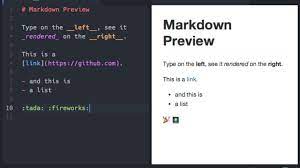
In the podcast titled "Learning Markdown Code," the host discusses the basics of Markdown, a simple and versatile language used for formatting text. The host begins by explaining the purpose of Markdown, which is to provide a way to create properly formatted content without needing to know complex HTML or coding languages. The podcast then delves into the syntax and usage of Markdown. It explains that Markdown uses symbols and characters to format and structure text. For example, an asterisk (*) can be used to create bullet points or to emphasize text, while hashtags (#) are used to create headings of different levels. The host also highlights various features and functionalities of Markdown, such as creating links, adding images, and formatting tables. They emphasize the simplicity and user-friendliness of Markdown, as well as its compatibility with various platforms and applications. The podcast wraps up by providing resources and recommendations for those interested in learning more about Markdown. The host suggests exploring online tutorials, documentation, and text editors that support Markdown formatting. They also stress the importance of practice and experimentation to become proficient in using Markdown effectively.
| Seed data: | Link 1 |
|---|---|
| Host image: | StyleGAN neural net |
| Content creation: | GPT-3.5, |
Host

Ellen Ellis
Podcast Content
Introduction (150 words):
Welcome to today's podcast episode on "Learning Markdown Code." In this episode, we will delve into the world of Markdown and explore how it can simplify the process of writing and formatting text. Markdown is a lightweight markup language that offers a simple and intuitive way to create styled documents with plain text. Originally created by John Gruber in 2004, it has gained immense popularity among writers, bloggers, and developers due to its uncomplicated syntax and flexibility. Whether you are writing a blog post, creating documentation, or preparing a readme file for your GitHub project, Markdown can be an invaluable tool to enhance your content easily. So, let's embark on this journey together to master Markdown and unlock its potential to make our writing process more efficient.
Understanding Markdown Basics (400 words):
To begin our exploration, let's cover the basics of Markdown syntax. Markdown uses a simple set of characters that are easy to learn and remember. It emphasizes readability and ensures the content looks great, regardless of the platform it is viewed on. Some of the most commonly used Markdown features include headings, bold and italic text formatting, lists, links, images, and code blocks.
Headings: Markdown allows the use of different levels of headings, denoted by hash symbols (#). For example, a first-level heading can be created using a single hash symbol (#), while a second-level heading can be created using two hash symbols (##), and so on.
Text formatting: To format your text, Markdown provides options like bold and italic. To make text bold, simply enclose it in double asterisks (**) or double underscores (__). Similarly, to italicize text, enclose it in single asterisks (*) or single underscores (_).
Lists: Markdown supports both unordered (bullet points) and ordered (numbered) lists. For unordered lists, you can use asterisks (*), hyphens (-), or plus signs (+). For ordered lists, simply start each line with a number followed by a period.
Links and Images: Adding hyperlinks and embedding images in Markdown is straightforward. Enclose the text you want to hyperlink in square brackets [], followed by the link in parentheses (). For images, use the same syntax but prepend an exclamation mark (!) before the square brackets.
Code Blocks: Markdown allows you to create code blocks to highlight programming code or terminal commands. Simply wrap the code in backticks (`) to create a single-line code block or use triple backticks (```) to create a multi-line code block.
Advanced Features and Extensions (600 words):
Markdown also offers advanced features and extensions that can take your writing to the next level. Many popular platforms and editors, such as GitHub, Stack Overflow, and VS Code, support these additional features.
Tables: While not natively supported in basic Markdown, you can still create tables using an extension like GitHub Flavored Markdown. Tables allow you to organize data into rows and columns, ideal for presenting tabular information.
Task Lists: Task lists are handy for creating to-do lists or marking completed tasks. By using square brackets [ ] and hyphens (-) or asterisks (*), you can quickly create interactive task lists.
Footnotes: If you need to add additional information that isn't crucial to the main text, Markdown allows you to add footnotes. Simply use square brackets and the caret (^) symbol to link to the footnote reference.
Mathematics Equations: For technical writers and scientists, Markdown supports writing mathematical equations using LaTeX syntax. This enables the inclusion of complex formulas and mathematical notations in your documents.
Extensions and Editors: Markdown has evolved over time, with various extensions and editors available that enhance its capabilities. Some notable ones include the Markdown Extended extension, which adds additional formatting options, and Typora, a popular Markdown editor that displays formatted text in real-time.
Conclusion (150 words):
In this podcast episode, we have explored the world of Markdown and learned how this lightweight markup language can simplify the process of writing and formatting text. Mastering Markdown can significantly improve the efficiency and readability of your written content, whether it's a blog post, project documentation, or a simple text file. By familiarizing yourself with the basics, such as headings, text formatting, lists, links, and code blocks, you will be able to create visually appealing and well-structured documents. Furthermore, by utilizing the advanced features and extensions, such as tables, task lists, footnotes, and mathematics equations, you can take your Markdown skills to the next level and cater to a wider range of writing needs. So, embrace Markdown and unlock its potential to enhance your writing experience today.