Eps 1: Flow Designer in Servicenow
— SN Flow
The text explains that Flow Designer is a tool within ServiceNow that allows organizations to automate and streamline their business processes. It is a cloud-based low-code development platform that provides a visual interface and drag-and-drop functionality. Flow Designer can integrate with third-party applications and systems, making it easier for businesses to streamline processes and improve collaboration. It reduces the need for IT involvement by allowing users with minimal coding experience to design and automate workflows. It can be used in various industries for tasks such as patient registration, incident management, and approval workflows. Flow Designer helps organizations reduce errors, eliminate repetitive tasks, and improve efficiency. It offers real-time analytics and monitoring capabilities, allowing organizations to track and analyze workflow performance. Overall, Flow Designer in ServiceNow enhances productivity, efficiency, and collaboration within organizations.
| Seed data: | Link 1 |
|---|---|
| Host image: | StyleGAN neural net |
| Content creation: | GPT-3.5, |
Host

Stacey Pena
Podcast Content
Introduction:
Welcome to today's podcast episode where we will be discussing the Flow Designer in ServiceNow. Flow Designer is a powerful tool that allows organizations to automate and streamline their business processes in the ServiceNow platform. In this episode, we will explore the features, benefits, and use cases of Flow Designer, as well as how it can enhance productivity and efficiency within an organization.
Overview of Flow Designer:
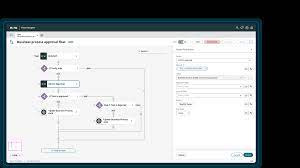
Flow Designer is a cloud-based low-code development platform that enables users to design and execute workflows without the need for extensive coding knowledge. It provides a visual interface, drag-and-drop functionality, and pre-built workflow templates to simplify the process of automating business processes. Flow Designer is part of the ServiceNow platform, a comprehensive suite of tools designed to help businesses manage their IT services, operations, and overall workflow.
Features and Benefits of Flow Designer:
One of the key features of Flow Designer is its ability to integrate with multiple third-party applications and systems. This allows organizations to create complex workflows that involve multiple systems, such as HR, finance, and customer service. Flow Designer also offers a wide range of pre-built integrations, including popular applications like Microsoft Office 365, Salesforce, and Slack. This makes it easier for businesses to streamline their processes and improve cross-departmental collaboration.
Another major benefit of Flow Designer is its low-code nature, which means that users with minimal coding experience can design and automate workflows. This reduces the need for IT involvement in every workflow change, enabling business teams to create and modify their own workflows without relying on technical resources. This results in faster turnaround times and increased agility for the organization.
Use Cases for Flow Designer:
Flow Designer can be used in a variety of use cases across different industries. For example, in the healthcare industry, Flow Designer can automate patient registration processes, appointment scheduling, and notifications to relevant departments. In the IT department, Flow Designer can automate incident management, change management, and service request fulfillment. Furthermore, Flow Designer can be used to create approval workflows, such as expense approvals, purchase order approvals, and employee onboarding processes.
By using Flow Designer, organizations can reduce manual errors, eliminate repetitive tasks, and improve overall efficiency. The visual interface makes it easy to build and modify workflows, allowing business teams to adapt quickly to changing requirements. Flow Designer also provides real-time analytics and monitoring capabilities, allowing organizations to track and analyze workflow performance, bottlenecks, and potential improvements.
Conclusion:
In conclusion, Flow Designer in ServiceNow is a powerful tool for automating and streamlining business processes. Its low-code nature, pre-built integrations, and visual interface make it accessible to users with minimal coding knowledge. Flow Designer provides organizations with the ability to automate complex workflows across various departments and systems, resulting in increased productivity and efficiency. By leveraging Flow Designer, businesses can ensure faster turnaround times, reduce manual errors, and achieve seamless cross-departmental collaboration.